

Best AI Translation for Polylang: How to Choose (2026)

Polylang manages your languages, translation groups and language switcher. It does not translate your content with AI. Polylang Pro adds machine translation only through DeepL with your own DeepL API key, and its own pricing page says it “does not provide a one-click ‘translate everything’ feature” (Polylang Pro pricing, checked November 2026). Everything else comes from an add-on.
That leaves you choosing among several plugins that look alike on a listing page. This guide gives you the criteria that actually separate them, then walks through the options.
Disclosure: we make LATW AI Translation for Polylang, one of the plugins listed below. We describe the other plugins only from what their public pages and WordPress.org listings state, dated November 2026. We did not benchmark them. Features and prices change, so check each vendor’s page before you buy.
Key Takeaways
- Polylang itself has no AI translation. Pro offers DeepL with your own key; for LLMs you need an add-on.
- Choose on six things: engine and cost model, background jobs, page-builder handling, SEO and custom fields, glossary and prompt control, and what happens to translations if you uninstall.
- Own-key (BYOK) plugins let you pay the AI provider directly. A hosted pay-per-word service suits owners without an API key.
- Gutenberg is covered by most of them (check each listing); Elementor support varies and is often paid. Divi, Bricks and similar builders are where support differs the most, so check before you commit.
What should you check before choosing an AI add-on for Polylang?
Start with the criteria, because feature lists on plugin pages blur together. These are the points that change your bill, your workload or your risk.
- Engine choice and cost model. Some add-ons work with OpenAI, Claude, Gemini, DeepL or Google. Others bundle a hosted service. With your own API key you pay the provider for what you use. With a hosted service you pay per word to the vendor. Neither is always cheaper; what matters is whether you can see the cost before the job runs. For real numbers, see our AI translation cost benchmark and the Batch API cost savings write-up.
- Background jobs or browser-bound. Some plugins translate while a browser tab stays open. Others queue jobs on the server so you can close the tab. For a site with hundreds of pages, this is the difference between an afternoon and a babysitting job.
- Page-builder handling. “Supports Elementor” can mean field-by-field translation or a rough pass over the whole page. Also check what happens on builders the plugin does not support: a clear refusal is safer than a half-translated page.
- SEO meta, ACF and custom fields. Titles and meta descriptions in Yoast, Rank Math, SEOPress or All in One SEO, plus ACF fields, are easy to miss and costly to fix by hand. Google’s guidance on multilingual sites covers localized URLs and hreflang annotations, so make sure translated slugs and meta fields are part of the job, not an afterthought.
- Glossary and prompt control. If your brand terms or tone matter, you want a glossary and an editable prompt. In LATW they are Pro features; check whether the other plugins offer them.
- Stale translations and ownership. Look for detection of content that changed after translation, and confirm that translations stay on your site if you uninstall the plugin or let a license lapse.
If you want a wider framework for judging output, see how to evaluate AI translation quality and how to choose an AI translation service for a website.
The Polylang AI translation options compared
Facts below come from each plugin’s WordPress.org listing or vendor page as of November 2026. “Not stated” means the page does not say; it does not mean the feature is missing.
| Option | Engines (per its page) | Cost model | Paid tier price (as of Nov 2026) | Elementor |
|---|---|---|---|---|
| LATW AI Translation for Polylang | OpenAI, Claude, Gemini, DeepL, Google Translate, MyMemory, custom OpenAI-compatible endpoint (some in Pro only) | Free plugin; own key or hosted LATW Cloud | Pro from $49/yr for 1 site | Field by field |
| AutoPoly (Cool Plugins) | Yandex, Chrome/Edge built-in AI free; Google Translate, OpenAI, Gemini in Pro; DeepL on vendor page | Plugin license | $79/yr for 1 site (list price $89 crossed out at check time), or $119 one-time lifetime | Supported, free/Pro split not stated |
| PolyTranslate AI for Polylang | OpenAI, DeepL, Google Translate, OpenRouter | Own key | Not stated on listing | Pro feature |
| AI Translator for Polylang (Matches) | OpenAI; Claude in premium | Own key, plus a cloud credits option | Not stated | “Experimental” |
| AI Translate For Polylang (jamesdlow) | OpenAI, Claude, Gemini, OpenRouter | Own key | Free, no paid tier | Not stated |
| Polylang Pro (built-in) | DeepL only | Own DeepL key | 99 EUR/yr for 1 site | Not compatible, per its page |
Sources: LATW plugin page, AutoPoly on WordPress.org and Cool Plugins product page, PolyTranslate AI, AI Translator for Polylang, AI Translate For Polylang, Polylang Pro.
LATW AI Translation for Polylang
This is ours, so read it with that in mind. The plugin is free on WordPress.org and does not expire. The free tier covers unlimited translations across the languages you set up in Polylang, with MyMemory, Google Translate, selected OpenAI and Gemini models, and LATW Cloud as engines. Gutenberg, Elementor, ACF, custom fields and the main SEO plugins (Yoast, Rank Math, SEOPress, All in One SEO) are handled.
Pro adds Claude, DeepL, a custom OpenAI-compatible endpoint, bulk translation, a glossary, an editable prompt, automatic translation of new content, and re-translating only the text that changed. Pro also lets you translate from your own AI app (Claude or ChatGPT) with no API key, published straight into linked Polylang posts. As of November 2026 Pro costs $49 per year for one site, multi-site licenses are available, and there is a 14-day money-back guarantee. If a license lapses, you keep a fallback version of the plugin that is never switched off, though it stops receiving updates and support.
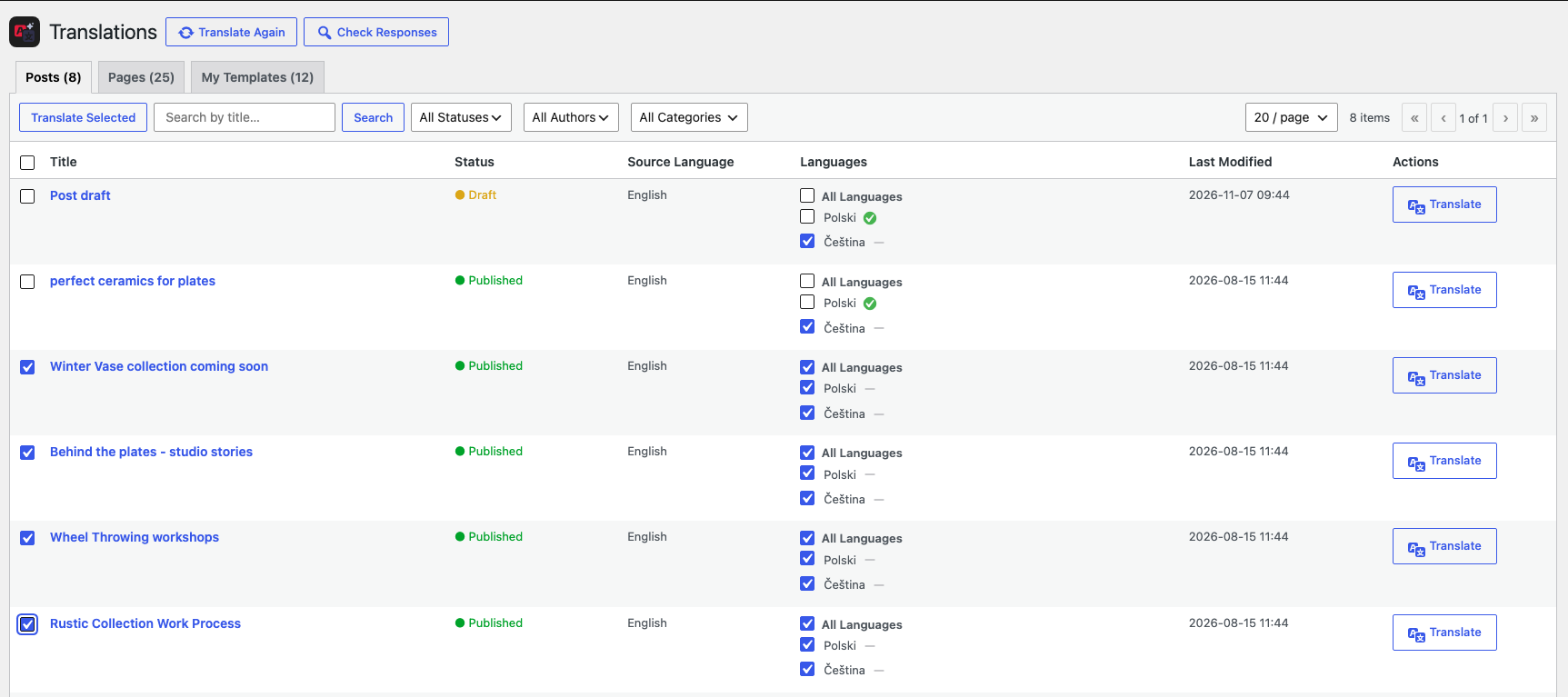
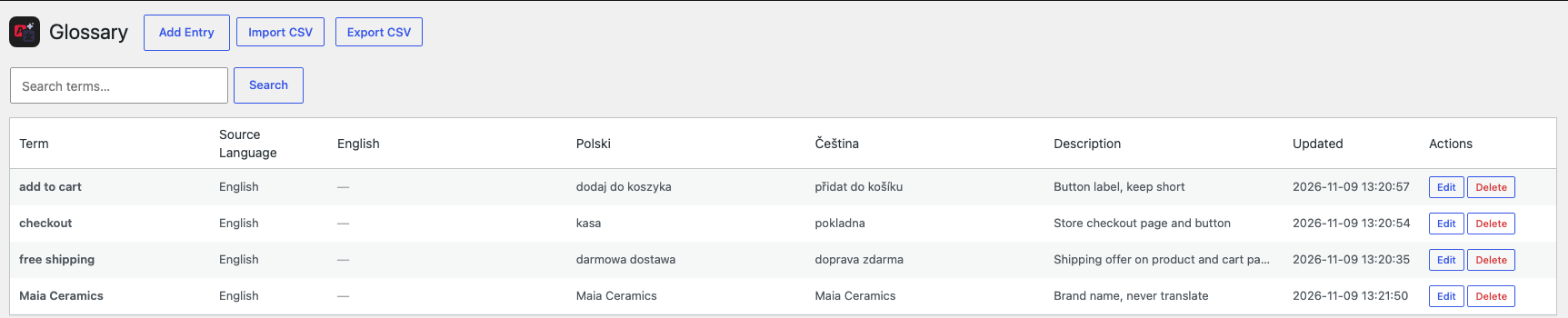
Screenshots from our own demo store (a fictional ceramics shop) running Polylang with Polish and Czech.
Jobs run in the background on the server, so closing the browser does not stop them, and each job’s token usage and cost appear in the history. Elementor is translated field by field. Divi, Bricks, WPBakery, Beaver Builder and Oxygen are not supported: the plugin refuses them rather than translating half a page. Translations stay on your site if you remove the plugin.
Be realistic about maturity too: the WordPress.org listing shows fewer than 10 active installations and no reviews yet (checked November 2026). The plugin is new, and you should test it on a staging copy first, as you would with any of these.
AutoPoly (Cool Plugins)
AutoPoly is the most widely installed option here, with 5,000+ active installations and a 4.6 rating from 30 ratings on its WordPress.org listing (checked November 2026). Its free tier leans on Yandex and the Chrome and Edge built-in AI, which need no API key. Google Translate, OpenAI and Gemini are in Pro, and the vendor page also lists DeepL. Pro adds bulk translation, classic editor translation, re-translation and taxonomy translation.
The listing says Chrome and Edge AI translate in the browser, while the FAQ says automatic translation runs in the background. Read both before assuming how a large job behaves. Page-builder coverage is broad on paper: Elementor, Gutenberg with several block libraries, and Divi, with WPBakery noted as “compatibility may vary”. The vendor page showed a license at $79 per year for one site (with $89 crossed out) and $119 one-time for a lifetime license on one site when we checked in November 2026. Treat those as time-of-check figures, since the page was running a limited-time sale.
PolyTranslate AI for Polylang
PolyTranslate AI is an own-key plugin: you connect OpenAI, DeepL, Google Translate or OpenRouter, and the listing says the vendor never sees your content or keys. The free tier covers posts, pages, custom post types, taxonomies and Gutenberg content. Premium adds AI bulk translation, ACF and other custom fields, SEO meta translation, Elementor page translation and automatic retranslation detection. The listing names no price or license tiers, so you would have to ask the vendor. It has 300+ active installations (November 2026).
AI Translator for Polylang (Matches)
AI Translator for Polylang works with OpenAI models, and its FAQ says Claude is a premium feature. The free version supports 2 languages; more languages, WooCommerce and Rank Math need premium. Elementor support is described as “experimental”, and other builders are not officially supported. It has 70+ active installations and a 5-star average from 11 reviews. The page does not state premium prices.
AI Translate For Polylang (jamesdlow)
AI Translate For Polylang is a free, own-key plugin that supports OpenAI, Claude, Gemini and OpenRouter, calling the provider directly from your server. There is no paid tier, and the page does not mention page builders. It has 100+ active installations. That makes it a reasonable pick for a small blog on plain Gutenberg content, and a risky one for builder-heavy pages without testing.
Polylang Pro’s built-in DeepL integration
If you only want DeepL, Polylang Pro covers it with your own DeepL key. The pricing page lists 99 EUR per year for one site and states the integration is “currently not compatible with Elementor and some builders” (Polylang Pro, checked November 2026). You also get XLIFF and PO import and export, which is useful if you hand files to a translation agency. For more on DeepL routes, see Polylang DeepL alternatives.
What about LATW Cloud, TranslatePress and Weglot?
LATW Cloud is a hosted option for owners who do not want to manage an API key. You pay per word from a prepaid balance, and you see the estimate before a job starts. As of November 2026 the pay-as-you-go rate for the Economy quality class (the cheapest of its three) is $0.0234 per 1,000 words per target language, which the LATW Cloud page puts at about $1.17 for a 50,000-word site into one language. Because words are counted once per target language, the same site in three languages would come to roughly 3 x $1.17 = $3.51 at that rate, and the estimate appears before you confirm. The minimum top-up is $5, credits do not expire, and the free LATW plugin connects to Cloud without a Pro license. Cloud also works beyond WordPress, which matters if you run other platforms.
That said, if you run Polylang on WordPress and are comfortable creating an API key with OpenAI or another provider, the plugin with your own key is usually the better fit: you pay the provider directly and control the engine. Cloud earns its place when you want one balance, no key handling, or you manage several sites on a Cloud plan.
TranslatePress and Weglot are not Polylang add-ons; they replace Polylang. TranslatePress lists plans from 99 EUR per year for one site, including 50K AI words (pricing page, November 2026). Weglot’s Starter plan is 15 EUR per month for 10,000 words and one language, and Business is 29 EUR per month for 50,000 words and three languages (Weglot pricing, November 2026). Both charge on the vendor’s terms, and both are subscription products, so check what happens to your translations if you cancel. If you are weighing a move, see free alternatives to Polylang, and our guide to migrating from Weglot to Polylang. Coming from WPML? Read WPML to Polylang migration.
Which option fits which situation?
| Your situation | What to look for | Options worth testing |
|---|---|---|
| Small blog, Gutenberg only, tight budget | Free tier (own key, or keyless browser AI) | AI Translate For Polylang (own key), LATW free plugin (own key), AutoPoly free (keyless, Yandex or browser AI) |
| Elementor site, many pages | Field-by-field handling, background jobs | LATW, AutoPoly, PolyTranslate AI (Pro) |
| No API key and no wish to manage one | Hosted pay-per-word with a visible estimate | LATW Cloud |
| Brand terms and tone matter | Glossary and editable prompt | LATW Pro, LATW Cloud |
| Only want DeepL | Built-in route | Polylang Pro, or plugins with DeepL |
| Builder is Divi, Bricks, WPBakery, Beaver or Oxygen | Explicit support for your builder | AutoPoly lists Divi; LATW does not support these builders |
| Want a one-time payment | Lifetime license | AutoPoly lifetime ($119 at time of check, November 2026) |
| Agency, many client sites | Multi-site pricing, one dashboard | LATW Pro multi-site license, LATW Cloud |
How to test an add-on safely before you commit
- Clone the site to staging. Never test an AI translation plugin on production first.
- Pick three representative pages: one plain post, one Elementor page, one with ACF or SEO meta.
- Run one job and read the cost. With your own key, check the provider dashboard; with a hosted service, compare the estimate to the final charge.
- Check the details the plugin should not break: shortcodes, links, buttons, slugs and meta titles.
- Change a source paragraph and see whether the plugin flags the translation as stale.
- Deactivate the plugin on staging and confirm the translated posts remain.
AI output still deserves a human review for pages that carry legal, medical or brand-critical wording. Treat the translation as a fast first draft that you approve, not a finished product you publish blind.
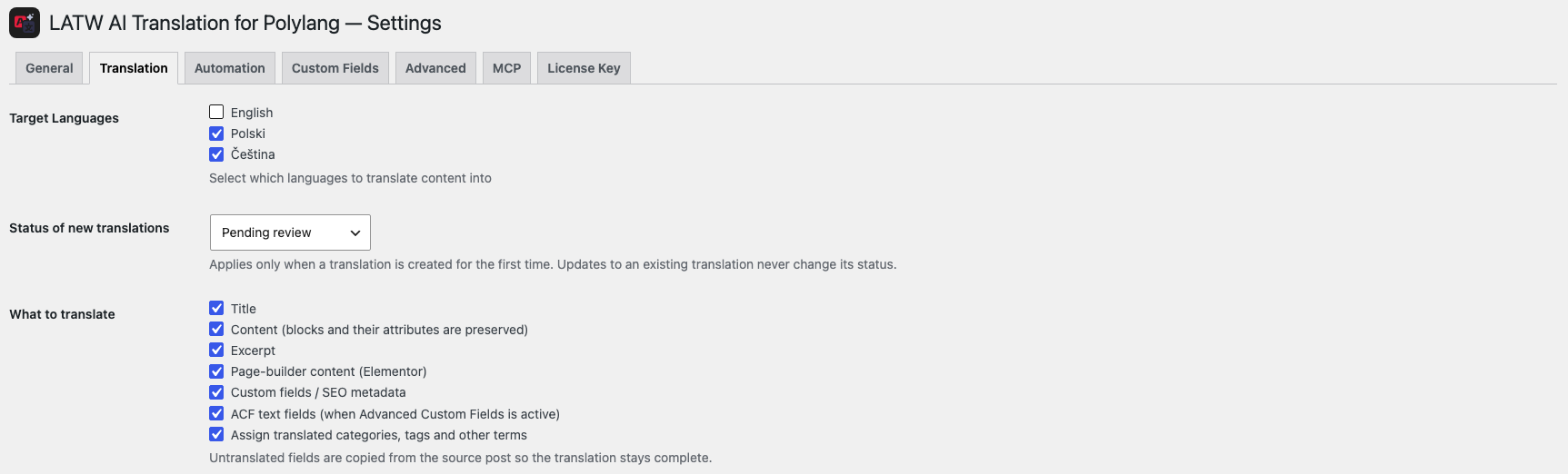
In LATW you can make that the default: set the status of new translations to Pending review, and nothing goes live until an editor approves it.
Frequently asked questions
Does Polylang have built-in AI translation?
No. Polylang manages languages and translation groups. Polylang Pro adds DeepL integration with your own DeepL API key, but no LLM-based translation (Polylang Pro, November 2026).
Is there a free AI translation plugin for Polylang?
Yes, several. LATW’s free plugin, AutoPoly’s free tier and AI Translate For Polylang all cost nothing for the plugin itself. With an own-key plugin you still pay the AI provider for usage, and free tiers differ in engines and features.
Should I use my own API key or a hosted service?
If you are comfortable creating a key, your own key gives you direct control over the engine and the bill. A hosted pay-per-word service is simpler when you do not want to manage keys or when you run several sites from one balance.
Will my translations disappear if I uninstall the plugin?
It depends on the plugin, so test it on staging. With LATW, translations stay on your site after you remove the plugin. Confirm the same for any alternative before you translate a whole site.
Can I translate Divi or Bricks pages with these plugins?
Not all of them. LATW does not support Divi, Bricks, WPBakery, Beaver Builder or Oxygen and refuses them instead of translating partially. AutoPoly’s listing says Divi page translation works, with Divi 5 in Pro. Check the current listing for your builder.
Next steps
If you are on Polylang and Elementor or Gutenberg, you can install the free LATW AI Translation for Polylang from WordPress.org and test it on a staging copy. If you would rather not handle an API key, try LATW Cloud and check the estimate before any job runs. Whatever you pick, run the six-step test above first. The right add-on is the one that handles your pages, at a cost you can see in advance.